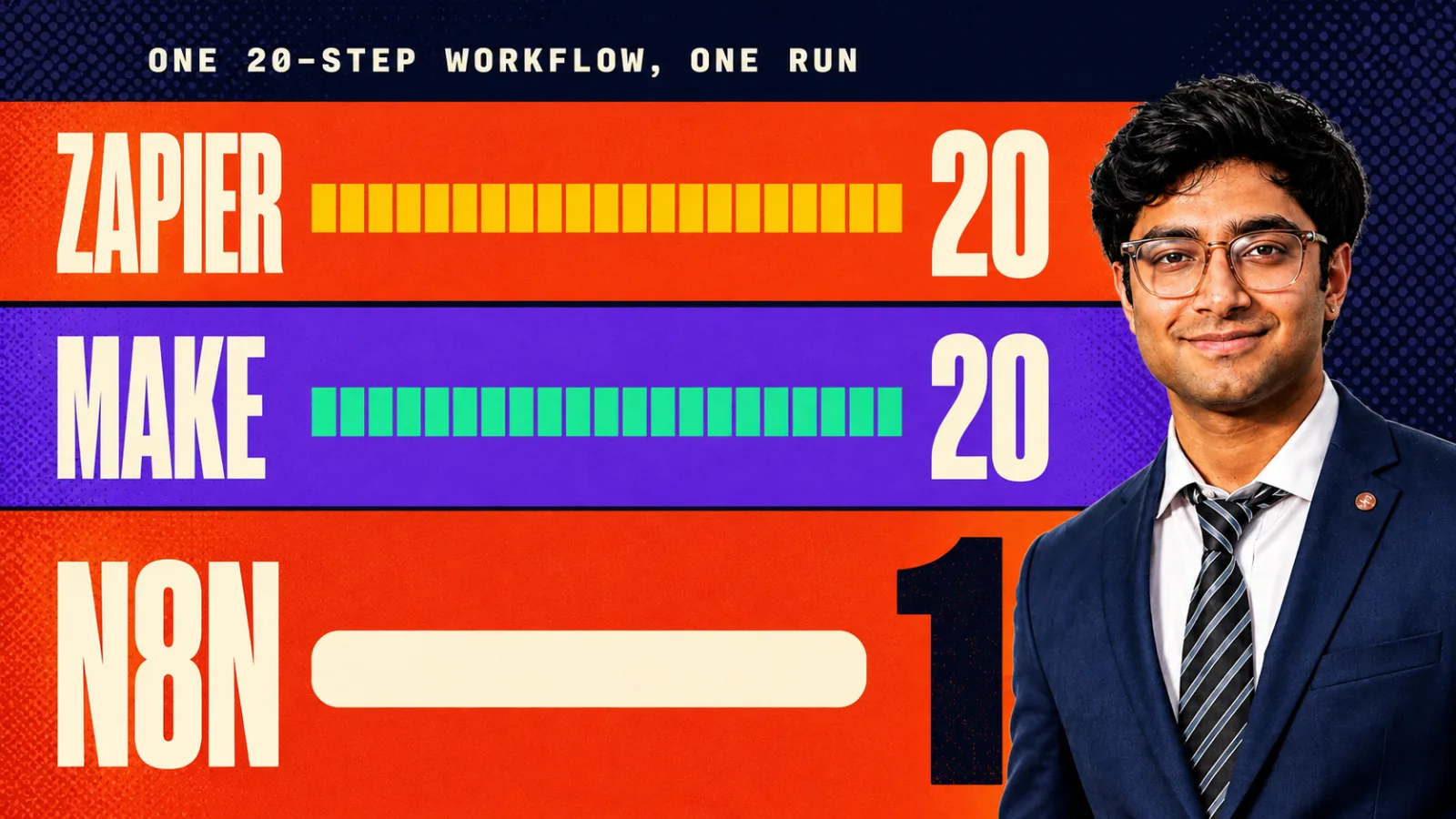
You already run n8n. One instance, a few dozen workflows, and a folder of HTTP Request nodes that each took an afternoon to get right.
Then someone asks for HubSpot. So you read the API docs, set up the auth, map the fields, and add node forty-one. Next month it is Linear. The month after that, Notion.
MCP is the part that stops. n8n has native support for it now, in three different shapes, and the docs cover each shape on its own page without ever telling you which one you actually want. This is the walkthrough: what each shape does, the exact steps, and the one transport setting that has already cost a team 95 million failed requests.
What does MCP actually change inside n8n?
MCP replaces one integration per service with one protocol per service. An MCP server publishes a list of tools and their input schemas. Your workflow reads that list at runtime and calls whichever tool fits. You configure a URL and a credential once, and new tools on that server show up without you editing the workflow.
That last part is the whole difference. An HTTP Request node is a contract you wrote by hand: this URL, this method, this body. When the vendor ships a new endpoint, your workflow knows nothing about it until you go and add it.
An MCP connection is a contract the server describes to you. HubSpot's remote server went generally available in April 2026 with write access, activity history and marketing objects attached, and any client already pointed at it picked those up on the next tool list refresh (HubSpot changelog).
n8n added its first two MCP nodes in version 1.88.0, in April 2025 (n8n release notes). The bigger change came later, and it is the one most teams have not seen yet.
An HTTP Request node is a contract you wrote. An MCP connection is a contract the server describes to you.
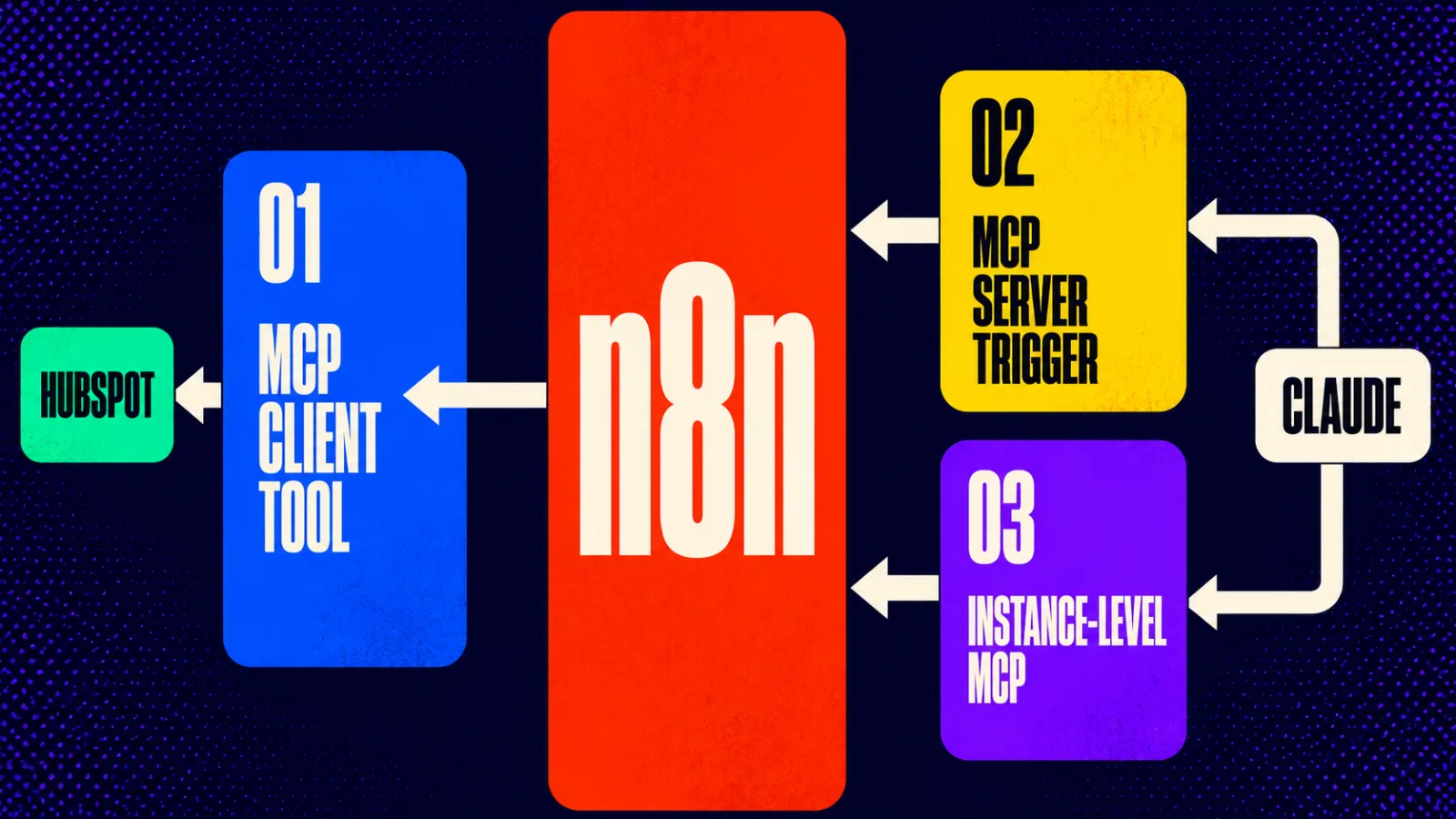
Three ways to connect n8n and MCP, and which one you need
There are three, they point in different directions, and picking the wrong one is where most of the wasted time goes.
| Approach | Node or setting | Direction | Auth | Pick it when |
|---|---|---|---|---|
| MCP Client Tool | Sub-node attached to an AI Agent | n8n calls out to someone else's server | Bearer, generic header, multiple headers, OAuth2 | You want one agent to use HubSpot, Notion or Linear tools without building a node per endpoint |
| MCP Server Trigger | Trigger node in its own workflow | An outside client calls into n8n | Bearer or header | You want to publish a small, fixed set of your own workflows as tools |
| Instance-level MCP | Settings, not a node | An outside client calls into n8n | OAuth2 or a personal MCP access token | You want Claude to search, run, build and publish workflows across the whole instance |
Most small teams reading this want the first row. The third row is the one that has changed most in 2026.
How do you let an n8n workflow call an external MCP server?
Attach an MCP Client Tool sub-node to an AI Agent node, set the transport to HTTP Streamable, paste the server endpoint, add the credential, then narrow the tool list before you test. Six fields, about ten minutes. The node is n8n-nodes-langchain.toolmcp if you are searching the canvas.
Here is the order that works.
-
Add an AI Agent node first. The MCP Client Tool is a cluster sub-node. It has no meaning on its own, because the thing choosing which tool to call is the agent. If you do not want an agent making that choice, you want an HTTP Request node, not MCP.
-
Attach the MCP Client Tool underneath it. It hangs off the agent's tool connector alongside any other tools you have already given it.
-
Set the transport to HTTP Streamable. Not SSE. The reason is a whole section further down and it is the single most expensive mistake in this post.
-
Paste the endpoint. For HubSpot that is
https://mcp.hubspot.com(HubSpot MCP docs). Every hosted MCP server publishes one URL like this. -
Pick the authentication. The node supports bearer, a generic header, multiple headers and OAuth2, plus None for servers that need nothing (n8n docs). HubSpot's server uses OAuth 2.1 with PKCE, so you create an MCP auth app in HubSpot first and use those credentials here.
-
Set Tools to Include to Selected. The default is All. A CRM server can expose dozens of tools, and every one of them lands in your agent's context on every single call. Choose the four or five you actually need.
Since n8n 2.22.0, released 19 May 2026, a handful of servers skip most of this. Apify, Linear, monday.com, Notion and PostHog can be connected without setting up the client node and credential by hand (n8n 2.x release notes). Anything outside that list still uses the manual path above.
How do you expose one n8n workflow as an MCP server?
Add an MCP Server Trigger node to a new workflow, turn on authentication, and connect at least one tool node to it. The trigger does nothing by itself. It is an entry point, and the tools hanging off it are what an outside client can actually call.
-
Create a new workflow and add the MCP Server Trigger. Give it its own workflow. Do not bolt it onto something that already has a trigger.
-
Leave the path random, or set your own. n8n generates a random path to avoid conflicts, and you can override it if you need a stable URL (n8n docs).
-
Turn on Bearer or Header auth. A random path is not a credential. Anyone who ends up with that URL can call every tool behind it.
-
Connect at least one tool node. The usual choice is the Custom n8n Workflow Tool, which points at another workflow and exposes it as a callable tool.
-
Know which of the two URLs you are handing out. The node shows a test URL and a production URL. The test one only registers while you are listening for an event or running the workflow manually. The production one registers when you publish. Handing someone the test URL is why "it worked yesterday" happens.
-
Fix your reverse proxy before you debug anything else. Both supported transports need proxy buffering off, gzip off and chunked transfer encoding disabled in nginx. The trigger supports SSE and streamable HTTP, and does not support stdio.
-
In queue mode, route every
/mcp*request to one webhook replica. With several replicas and no routing rule, connections fail in a way that looks like a client bug and is not.
A random URL path is not authentication. It is obscurity with a shorter half-life than your Slack history.
How do you connect Claude to your whole n8n instance?
Turn on instance-level MCP in Settings, enable each workflow you want exposed, then point Claude at https://<your-n8n-domain>/mcp-server/http. This is the 2026 change worth knowing about, because it is not a node at all. It is an instance feature that lets a client search, run, build and publish workflows.
The steps:
-
Enable the module. Self-hosted instances set
N8N_MCP_ACCESS_ENABLED=true, available from v2.20.0. SettingN8N_DISABLED_MODULES=mcpremoves the feature completely, which is the switch to reach for if you would rather not have this surface at all (n8n docs). -
Go to Settings, then Instance-level MCP, and toggle Enable MCP access. You need instance owner or admin permissions.
-
Enable workflows one at a time. There is no blanket switch, and that is deliberate. You can do it from the MCP settings page, from a workflow's Settings menu with the "Available in MCP" toggle, or from the card menu in the workflows list.
-
Choose OAuth2 or an access token. OAuth2 redirects the user to n8n to authorise, and you revoke it later from the Connected clients tab. The access token is generated on your first visit to that panel and shown once, so copy it immediately.
-
Point the client at the endpoint. For Claude Code that is one line:
claude mcp add --transport http n8n-mcp https://<your-n8n-domain>/mcp-server/http
What the client gets is a real toolset, not a single "run workflow" button. search_workflows, get_workflow_details, execute_workflow and test_workflow cover reading and running. search_nodes, validate_workflow, create_workflow_from_code and update_workflow cover building. There are separate tools for data tables and for executions (MCP server tools reference).
The build path is more careful than it sounds. n8n generates a TypeScript representation of the workflow that has to type-check before it touches your instance, so a malformed workflow fails validation instead of landing broken in your editor.
One limit to plan around, stated by n8n when the feature was in beta: there is no per-client scoping. Any connected client sees every workflow you enabled for MCP (n8n community announcement). Triggers that can be exposed were webhook, chat, form and schedule. Check both against your version before you assume they still hold.
Which transport should you pick, HTTP Streamable or SSE?
HTTP Streamable, always, on both the client and server side. SSE still appears in the dropdown and still works with older servers, but it was deprecated in the MCP specification in the 2025-03-26 revision and the spec now documents it only for backwards compatibility (MCP transports spec).
n8n added HTTP Streamable to the MCP Client Tool in version 1.104.0, released 21 July 2025 (PR #15454).
The reason this matters more than a normal deprecation notice: the transport dropdown has a history of being ignored at runtime. One self-hosted team reported the node showing HTTP Streamable as selected while sending SSE-style GET requests underneath, producing roughly 95 million failed requests over eight days, peaking near 47 requests per second per workflow, at a 99.98% error rate, with nothing visible in the n8n UI (issue #24967). They were effectively attacking their own Cloudflare Worker.
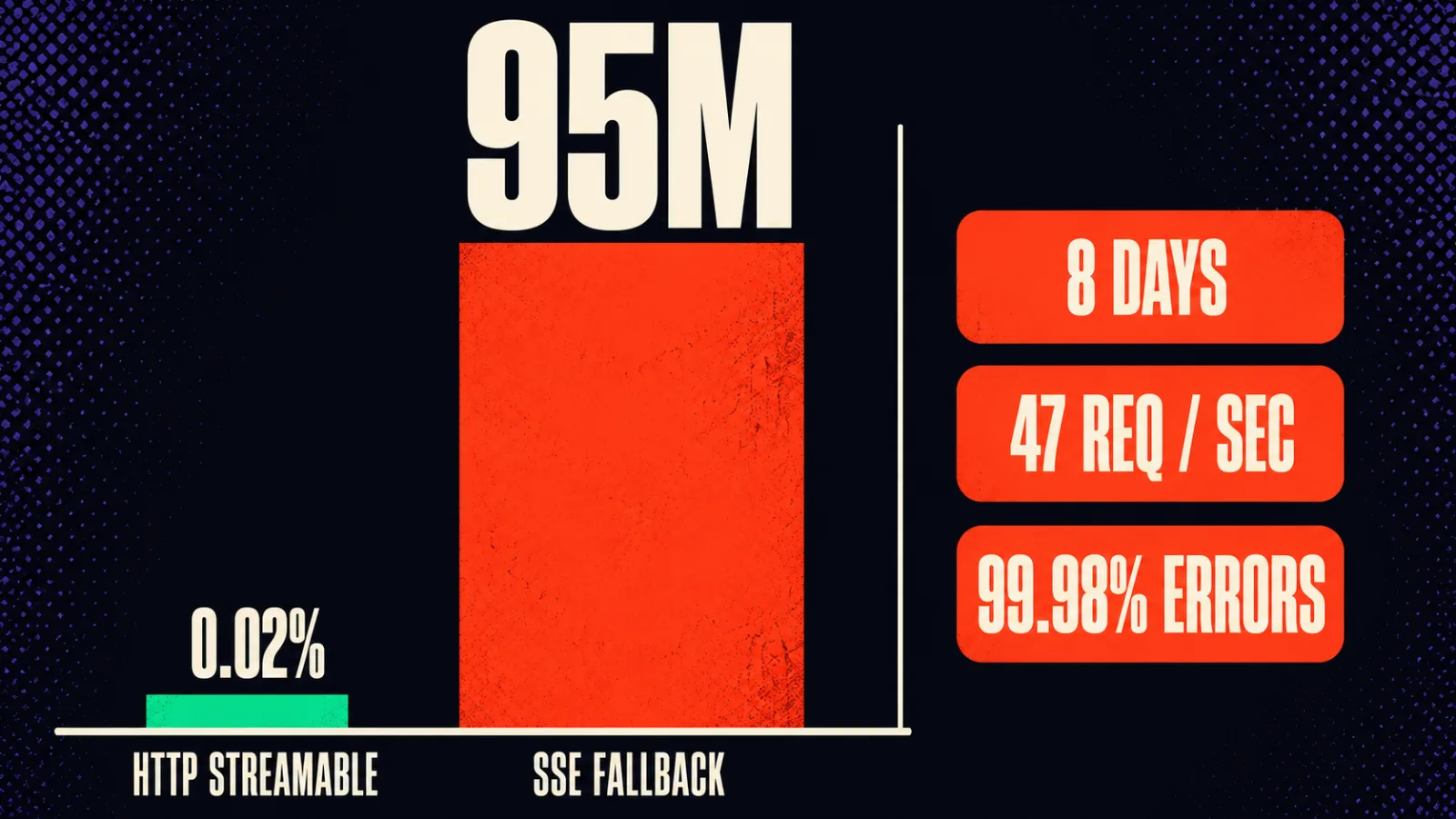
The reported workaround is ugly and worth knowing: switch the serverTransport field to expression mode, set it explicitly to the string httpStreamable, and restart the instance. Reselecting from the dropdown does not clear it. A related report on version 1.107.4 in August 2025 described the same mismatch (issue #18938).
So after you set the transport, watch the outbound request count for an hour. Not because it will definitely go wrong, but because when it does go wrong it is silent, and eight days is a long time to be paying for it.
The dropdown said HTTP Streamable. The wire said SSE. The bill said 95 million requests.
What can a connected MCP client actually see?
Everything you enabled, to every client you connected. That is the honest version. Instance-level MCP is per instance and per workflow, not per client, so an OAuth connection from a design tool and one from Claude Desktop see the same list.
Three things follow from that, and all three are policy decisions rather than settings:
- Enable workflows deliberately, not in a batch. The per-workflow toggle exists because the blast radius of "expose everything" is your whole automation surface.
- Keep anything touching money or customer data off the list until you have watched the rest for a few weeks. An agent that can call
execute_workflowcan run whatever that workflow runs. - Treat the personal access token like a password. It is tied to your user account and carries your access.
If your team already thinks about this stuff, none of it is new. If it does not yet, MCP is a fast way to find out.
Common mistakes
Assuming Claude is an MCP server. It is a client. The direction of "connect n8n to Claude" is Claude reaching into n8n, through the MCP Server Trigger or instance-level MCP, not n8n calling out to Claude. Teams lose an afternoon looking for a Claude endpoint to paste into the MCP Client Tool. There is not one. If you want n8n to call a model, that is the model node, not MCP.
Leaving the transport on SSE. Covered above, and it is the expensive one. Set HTTP Streamable, then verify with your outbound request count rather than with the dropdown.
Handing an agent all the tools. Tools to Include defaults to All. Every exposed tool and its schema sits in the agent's context on every call, which costs tokens and makes tool selection worse. Selected is almost always the right setting.
Relying on the random path instead of auth. The MCP Server Trigger generates a random path, which reads like security and is not. Turn on Bearer or Header auth. The path stops accidental discovery, nothing more.
Debugging the client when the problem is your proxy. SSE and streamable HTTP both need buffering and gzip off, and queue mode needs /mcp* pinned to one webhook replica. Connection drops that look like a broken client are usually nginx doing exactly what it was configured to do.
Key takeaways
- MCP swaps one hand-built integration per endpoint for one connection per service, and new tools on that server appear without a workflow edit.
- The three approaches point in different directions: MCP Client Tool calls out, MCP Server Trigger and instance-level MCP let clients call in.
- The MCP Client Tool only works attached to an AI Agent node, because the agent is what picks the tool.
- Set the transport to HTTP Streamable everywhere. SSE was deprecated in the MCP spec's 2025-03-26 revision and n8n's transport selector has been reported as ignored at runtime.
- Instance-level MCP has no per-client scoping, so every connected client sees every workflow you enabled.
- Enable workflows one at a time and keep money and customer data out of the first batch.
- If your reverse proxy buffers or gzips, MCP connections fail in ways that look like client bugs.
If you already have the automation stack and want the MCP layer built and tested properly, that is the kind of thing we do as workflow automation work. And if you are still deciding whether n8n is the right instance to be doing this on, the n8n vs Zapier vs Make cost breakdown covers what each one actually costs a team of your size. For the agent side of it, our comparison of the Claude Agent SDK, LangGraph and OpenAI Agents SDK covers what to run when n8n's agent node stops being enough.