
You needed an illustration for a landing page. You searched, found a good one, downloaded the SVG, dropped it in, shipped.
Three things you probably did not check: whether the licence lets you use it commercially, whether it obliges you to credit someone in your footer, and whether the file contains a script tag.
The roundups of free SVG sites all list the same dozen names and call them free. Some of them are. Several want something back, and one of them wants it in your footer forever. Here is what each licence actually says, and the two cases where the right move is not downloading anything.
Where do you actually get free SVGs?
Here are the ones worth using, with what each licence requires rather than what the homepage says.
| Source | Best for | Attribution | Commercial use | Watch out for |
|---|---|---|---|---|
| unDraw | Product and landing page illustrations | None | Yes | One recognisable style. If three competitors use it your pages look related |
| Humaaans | Mix and match people | None, CC0 | Yes | Design-file first, so you may be exporting from Figma rather than grabbing an SVG |
| Open Peeps | Hand-drawn people | None, CC0 | Yes | Same style ubiquity problem as unDraw |
| Pixabay | Odds and ends, mixed quality | None | Yes | The licence bars redistributing assets as-is, which catches template sellers |
| SVG Repo | Icons, huge catalogue | Per icon | Per icon | Licences vary file by file. Check each one, not the site |
| Storyset | Animated illustrations | Required on free | Yes, with credit | Freepik account. Paid tier removes the credit |
| Freepik | Enormous catalogue | Required on free | Yes, with credit | The credit is a visible link, not a comment in your source |
| Flaticon | Icons, 18M+ | Required on free | Yes, with credit | Exact format specified: "Icons made by X from flaticon.com" |
| Lineicons | Consistent icon set | Free tier varies | Check tier | Read the tier you are on, not the marketing page |
The first four are the ones you can use without thinking. Everything below the line in that table is free in the sense that a puppy is free.
Free with attribution is not free. It is a trade, and the currency is a permanent link in your footer.
The attribution trap
Attribution licences are fine. The problem is that people accept them without reading what the credit has to be, and the requirement is usually more specific than expected.
Flaticon's free licence names the exact wording: "Icons made by [creator] from https://www.flaticon.com". Freepik requires a visible credit for free downloads. Storyset requires one on its free tier.
Three things follow.
It has to be visible. A comment in your HTML is not attribution. Neither is a line in a README nobody opens.
It compounds. Twelve icons from three creators means three credits. A client site with a designer-approved footer does not have room for that, and removing it later means replacing every icon.
It survives the redesign. You will forget which assets carry it. Two years on nobody remembers whether that footer line is load bearing or a leftover, and the safe answer becomes "leave it".
If a project is going to a client, either use CC0 sources or budget for the paid tier. Handing someone a site with a licence obligation they do not know about is a bad thing to do quietly.
An SVG is code, not an image
This is the part the roundups leave out entirely, and it is the one that can actually hurt you.
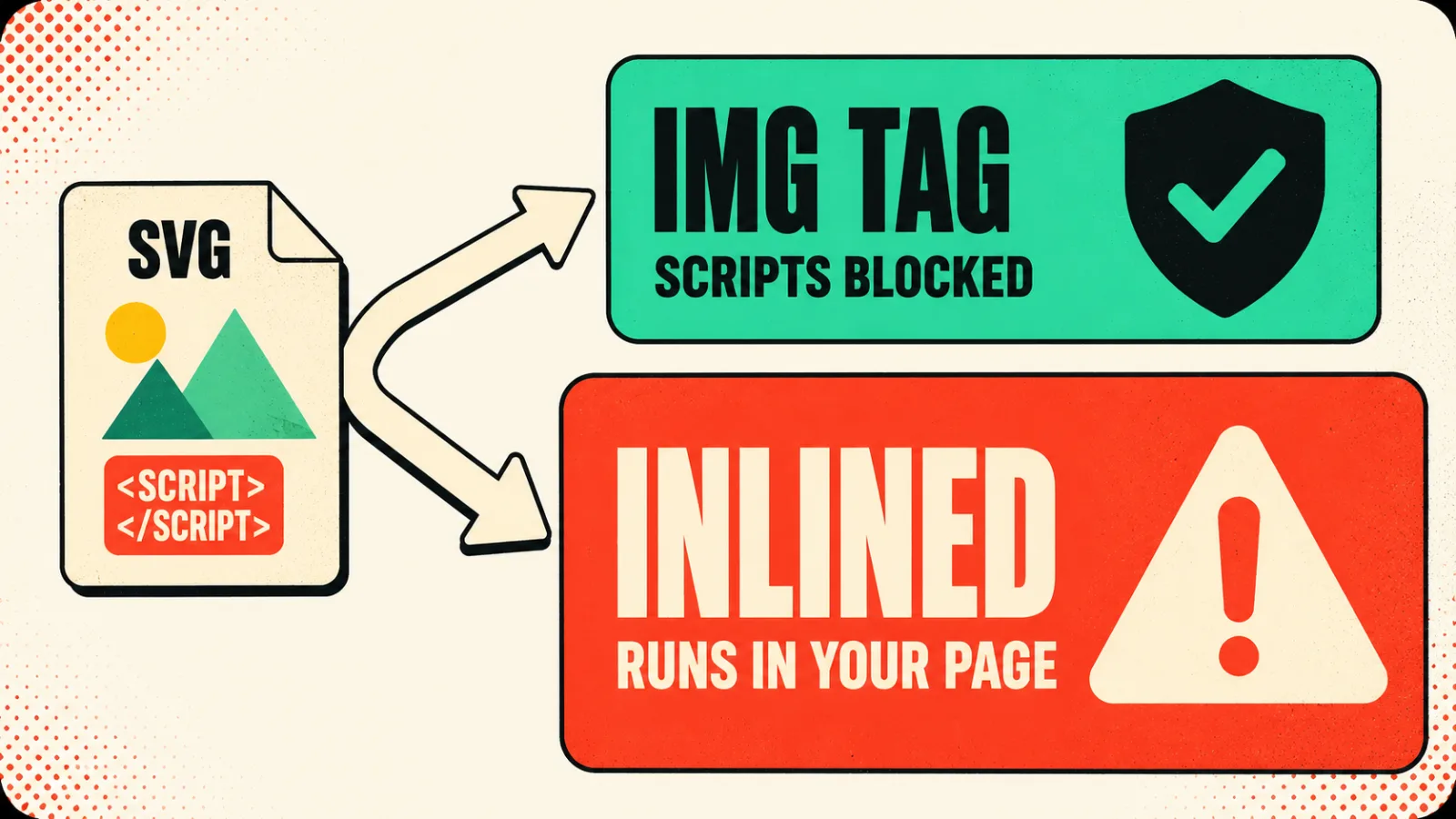
An SVG is XML. It can contain <script> tags, event handlers like onclick, external entity references and CSS that phones home. A PNG cannot do any of that.
Whether it can run depends on how you put it on the page:
<img src="thing.svg">is safe. Browsers disable scripts and external resource loading for SVGs referenced this way.- Inlining the markup is not. Pasting the SVG into your JSX, or injecting it through
innerHTML, runs it in your page's context with access to your DOM and your cookies.
Downloading from a reputable source makes this unlikely, not impossible. The rule that costs you nothing: use <img> unless you specifically need to style the SVG's insides with CSS. You usually do not.
If you do need it inline, or if users can upload SVGs, sanitise server side with something vetted. DOMPurify handles SVG with the right profile. Do not write a regex for this; SVG payloads encode in more directions than a regex will catch.
When the right answer is not downloading one
Two cases, and we hit both on this site.
When the graphic has to carry your brand. Downloaded illustration sets bring their own palette. Drop one onto a page with a single accent colour and a warm paper ground and it fights everything around it. You can recolour unDraw in one click, which helps, but the shapes and the character design still belong to somebody else's system.
Every page visual on kraftzen.in is hand-built HTML and CSS with SVG only for connector lines. No network request, no licence, sharp at any size, and it reads the brand tokens so it cannot clash. It took an afternoon each and they will never look dated in the way a 2021 illustration pack does.
When the graphic has to be right rather than pretty. A diagram explaining how your product works has no stock equivalent. If you download something approximate you have decorated the page rather than explained anything.
The honest counterweight: this is only worth it for a handful of visuals you will keep. For a blog post header or a 404 page, download one and move on.
A downloaded illustration decorates the page. A drawn one explains it. Most pages only need the first.
Make them small before you ship
SVGs from illustration sites are routinely five to ten times bigger than they need to be. Editor metadata, invisible layers, forty decimal places of precision on every coordinate.
Run SVGO over anything you download:
npx svgo --folder ./src/assets --recursive
It strips the editor cruft and rounds coordinates without a visible difference. On a page carrying six illustrations this is often a larger saving than any image format decision you will agonise over.
One caution: SVGO can break animations and remove ids your CSS or JavaScript targets. If the SVG is animated or scripted, check it after optimising rather than trusting the diff.
Common mistakes
Treating "free" as one licence. It covers CC0, free-with-credit, free-for-personal-only and free-until-you-are-commercial. These are four different agreements and only the first is genuinely free.
Checking the site licence instead of the file licence. SVG Repo and similar aggregators host assets under many different licences. The site being free says nothing about the file you just downloaded.
Inlining SVGs from a source you do not control. Use <img> unless you need CSS access to the internals. It costs you nothing and closes the whole attack class.
Using one illustration pack for a brand. unDraw is good, which is why it is everywhere. If your landing page looks like three other products in your category, that is not a licensing problem but it is still a problem.
Shipping the raw download. Illustration exports carry editor metadata and unnecessary precision. Two seconds of SVGO usually removes most of the file.
Key takeaways
- unDraw, Humaaans and Open Peeps need no attribution and are safe for commercial work. Start there.
- Freepik, Flaticon and Storyset are free with a visible credit on their free tiers, and Flaticon specifies the exact wording.
- Aggregators like SVG Repo carry per-file licences. Check the file, never the homepage.
- An SVG is XML and can contain scripts.
<img>blocks them, inlining does not. - If users can upload SVGs, sanitise server side with a vetted library. Never with a regex.
- For visuals that carry your brand or explain your product, hand-built HTML and SVG beats anything you can download.
- Run SVGO over every download. Five to ten times smaller is normal, and check animated files afterwards.
We build page visuals as code rather than downloads for the reasons above, and it is part of how the sites we build stay fast and stay on brand. If you want the short version: check the licence per file, use <img>, run SVGO, and draw the two or three visuals that actually carry your product.